Facebook Business Manager Restrictions and Account Recovery: The Complete Guide
A restricted Business Manager stops every ad you run. Here is how to find out what Meta restricted, why, and the exact recovery steps, from identity checks to a review request that works.

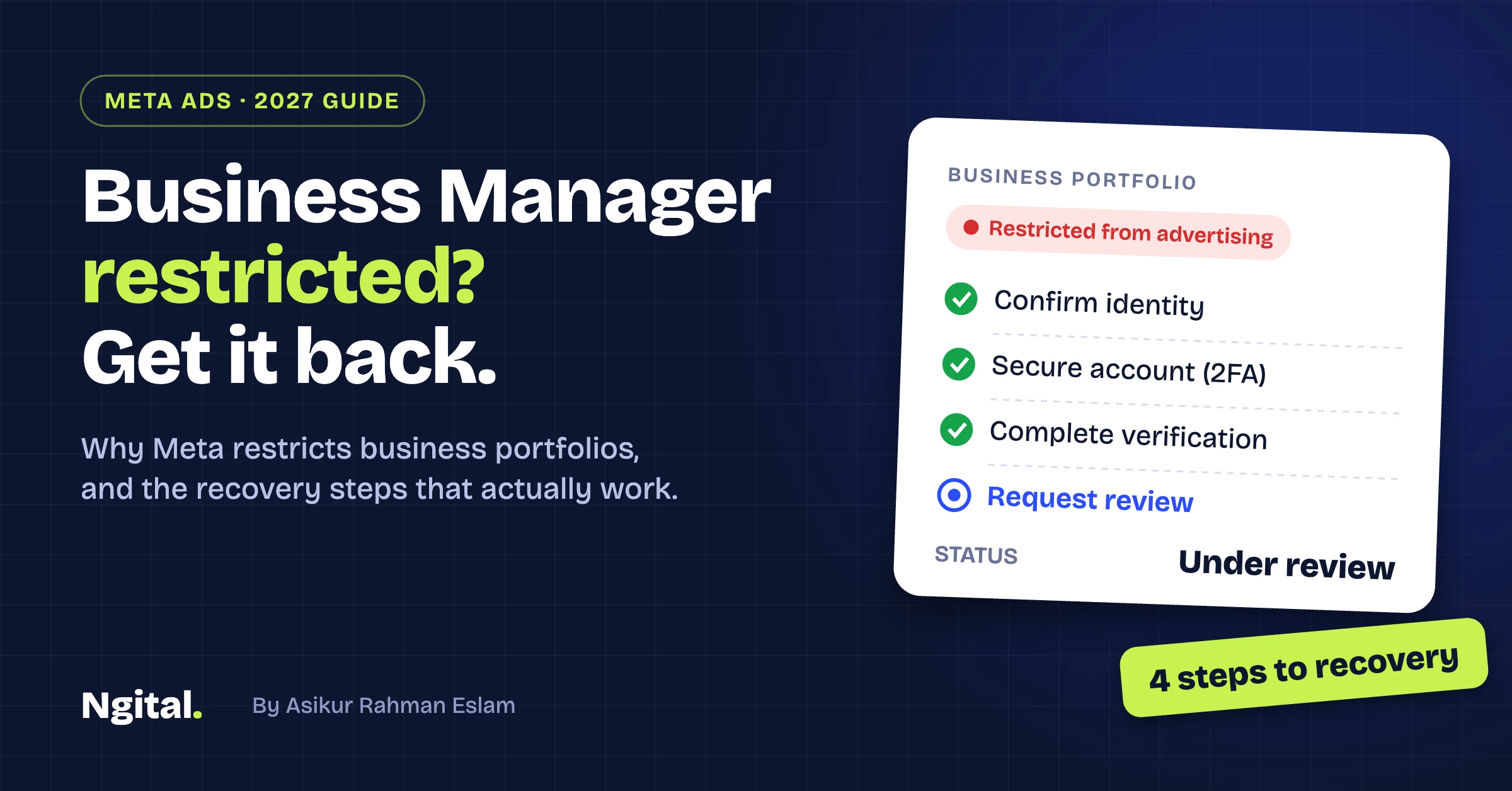
You open Ads Manager on a Monday morning and every campaign has stopped. A red banner says your business portfolio is “restricted from advertising”. Leads stop, sales stop, and the “Request review” button feels like a coin toss.
We manage Meta ad accounts for more than 200 brands, so restrictions are part of our week. Most of them can be fixed. The ones that stay broken usually got worse because someone panicked: they appealed too early, opened a new account to “get around it”, or sent five appeals from five profiles.
This guide explains what each restriction means, why Meta applies it, and the exact recovery path, in the order that gives you the best chance of getting your account back.
The short answer
- Find out what is restricted first. A restriction can sit on the business portfolio, an ad account, a Facebook Page or a person’s profile. Each one blocks different things.
- Use Meta Business Support Home. On a computer, open Business Support Home, click the restricted asset under Account overview, and follow the steps in the What you can do section.
- Do the steps in order. Meta may ask you to confirm your identity, complete verification, secure your account and only then request a review. Only an admin can request a review.
- Never open a new account to bypass a restriction. Meta treats that as evading enforcement, and it can turn a fixable restriction into a permanent one.
- Act within six months. An ad account disabled for a policy violation that stays ineligible for six months can’t be reinstated, and unused prepaid balance may be forfeited.
Business Manager, Business Suite or business portfolio?
Meta has renamed its tools several times, which makes help articles confusing. Business Manager is now called a business portfolio. It is the container that owns your Pages, Instagram accounts, ad accounts, pixels (datasets), catalogs and WhatsApp numbers. Meta Business Suite is the app you use to manage it.
So when someone says “my Business Manager is restricted”, they almost always mean the business portfolio. We explain the difference in detail in Meta Business Manager vs. Business Suite.
The four types of Meta restriction
Meta can restrict four different things. The fix depends on which one is flagged, so check this before you do anything else. According to Meta’s Troubleshoot a disabled or restricted account page and its Advertising Standards:
| What is restricted | What it blocks | What still works |
|---|---|---|
| Business portfolio | The whole portfolio can’t advertise. You may also lose the ability to create ads or share audiences. | You can usually still see reports and post organically on Pages. |
| Ad account | That ad account and its ads stop. Other ad accounts in the portfolio may keep running. | Other healthy ad accounts in the same portfolio. |
| Facebook Page | That Page can’t run ads. | Organic posting on the Page. |
| Personal profile | That person can’t advertise or create ads anywhere. If they were the only person on an ad account, the account may stop too. | Other people in the same ad account can still advertise. |
WhatsApp Business accounts can be restricted separately. That blocks messaging rather than ads, and it has its own review path.
A profile restriction is the one people miss most often. If your media buyer’s personal Facebook profile is restricted, every account they touch looks broken. Adding a second, clean admin to the ad account often gets ads running again while the profile is reviewed.
Why Meta restricts business portfolios and ad accounts
Meta rarely gives a detailed reason. In our experience, almost every restriction falls into one of these groups.
1. Ad policy violations
Repeated rejected ads add up. Common triggers are before-and-after images, personal attribute targeting (“Are you overweight?”), unrealistic income claims, prescription drugs, and landing pages that don’t match the ad. Financial products, health, dating, crypto and politics have extra rules. One rejected ad is rarely the problem. A pattern is.
2. Account integrity and authenticity
Meta looks at how an account behaves, not just at the ads. Signals that trigger restrictions include:
- A brand-new business portfolio that spends heavily on day one.
- Logins from many devices, countries or VPNs within a short time.
- Profiles that look fake or newly created, with no history.
- Automation through apps or scripts that “mimics human activity”.
That last one catches legitimate businesses too. In July 2026, a company on Meta’s developer forum reported that its portfolio was restricted for automation that “mimics human activity” while running a production chatbot. Its appeal was denied the next day with no detail.
3. Compromised accounts
If a hacker gets into an admin’s profile, they often add themselves to the business portfolio and run scam ads on your card. Meta may restrict the portfolio to stop the damage, even though you are the victim.
4. Links to other restricted assets
Meta’s policy on violating networks or associations says advertisers must not manage business assets connected to other violating assets. In practice, if you share admins, payment cards or Pages with a portfolio Meta has already banned, the restriction can spread to yours.
This is common in Bangladesh, where many small advertisers rent “agency ad accounts” from resellers or add freelancers they have never met. If the reseller’s other clients break the rules, your Page can be caught in the same net.
5. Evading enforcement
Meta’s evading enforcement policy lists what it punishes most heavily. That includes running the same rejected ads across several accounts, and creating new business assets after earlier ones were restricted. This is why “just make a new Business Manager” usually ends with every asset banned.
6. Payment problems
A failed card payment can disable an ad account. This is a billing restriction, not a policy one, and it is fixed by paying the outstanding balance rather than by appealing. Bangladeshi cards decline often because of the USD 300 per-transaction limit and VAT charges, which we cover in our guide to VAT and AIT on digital ads.
How to recover a restricted Business Manager: step by step
This is Meta’s official path, with the practical detail we add when we handle a case for a client.
Step 1: Stop and diagnose before you click anything
Don’t press “Request review” yet. You may get only a limited number of reviews, and Meta checks your whole setup again when it reviews. Write down:
- Which asset is restricted (portfolio, ad account, Page or profile).
- The exact wording of the restriction and the date.
- Any rejected ads in the last 90 days.
- Anything that changed recently: new admins, new apps, new payment card, new country logins.
Step 2: Open Meta Business Support Home
On a computer, go to Meta Business Support Home (facebook.com/accountquality takes you there). Under Account overview, click the restricted asset. Look for the What you can do section. This is where Meta tells you which of the next steps it needs.
Step 3: Confirm your identity
Meta may ask for an SMS code, your account email, the payment method on the ad account, or a photo of a government ID such as a passport, national ID card or driving licence. Use the in-product upload only.
The name on the ID must match the name on the Facebook profile. A profile called “Rafi Digital” or “Sumon Bhai” with a national ID for Mohammad Rafiqul Islam will often fail. Fix the profile name first, and expect a short wait before Meta accepts the change.
Step 4: Secure the account
Before you appeal, make the account safe so Meta can see the risk is gone:
- Turn on two-factor authentication for every admin, preferably with an authenticator app rather than SMS.
- Check Settings > People in the business portfolio and remove anyone you don’t recognise.
- Check Partners and remove agencies or freelancers you no longer work with.
- Under the profile’s Security and login settings, log out of devices you don’t recognise.
- Remove third-party apps you don’t use from Business integrations and Apps and websites.
- Verify the business email address on the portfolio.
Step 5: Complete business verification if it is offered
If Security Center or the restriction screen offers business verification, finish it before you appeal. For a Bangladeshi company, the usual documents are a trade licence, certificate of incorporation, or a utility bill or bank statement in the business name. The legal name, address and phone number must match what you entered in the portfolio.
Step 6: Request a review with a clear, short appeal
Only an admin of the restricted asset can request a review. Keep it factual. Meta’s reviewers read many appeals a day, and long emotional messages don’t help.
A good appeal answers four questions:
- Who you are and what the business does.
- What you think caused the problem, if you know.
- What you have changed since.
- What you are asking for.
Here is a template we adapt for clients:
We are [Business Name], a [type of business] in [city, Bangladesh], advertising [products or services] since [year]. On [date], our business portfolio was restricted from advertising. We have reviewed our account and found [for example: a former freelancer’s profile still had admin access / two ads that made health claims]. Since then we have removed all unknown users and partners, turned on two-factor authentication for every admin, completed business verification and deleted the ads in question. All future ads will follow Meta’s Advertising Standards. We request a review of this restriction.
Step 7: Wait, and keep the account stable
Meta does not publish a standard review time. While you wait, don’t add new admins, change payment methods, launch other ad accounts or send duplicate appeals from other profiles. Each change can restart the risk checks.
If your Business Manager was hacked
A hacked account needs a different order, because Meta won’t restore business access to a profile that is still compromised.
- Recover the personal profile first at facebook.com/hacked. Use a phone or computer you have logged in from before, on your usual network.
- Secure your email account too, since hackers often change the Facebook password through email.
- Pause every ad you didn’t create and remove unknown payment methods. Call your bank to block the card if it was charged.
- Remove intruders from the business portfolio’s People and Partners lists, and from the Page’s access settings.
- Report the compromise through Meta’s business support channels, with screenshots of the unauthorised ads and charges.
- Then request a review of any restriction that resulted from the hack.
If a hacker removed every admin, the portfolio still exists. Ask any remaining admin or partner agency with full control to add you back. If nobody is left, you need Meta’s support flow for lost business access, with documents proving you own the business and its assets.
If you lost admin access (no hack involved)
Often nobody hacked anything. The person who set up the account just left.
- Check every email address the business has ever used. Log in to business.facebook.com with each one.
- Ask your former agency or freelancer. Agencies often still have partner access.
- Look under Settings > People with any account that still works, and find who has Full control.
- When someone gives you access, add a second full-control admin straight away. Add the new admin before removing the old one, never the other way round.
What to do if your appeal is denied
A denial is not always the end, but your options narrow.
- Check whether a second review is offered. If the “Request review” button is gone, Meta considers the decision final for that asset.
- Contact Meta support through a verified channel. Advertisers with a Meta Verified for Business subscription, or a Meta-assigned account representative, can raise a case with a person. Agencies that are Meta Business Partners can sometimes escalate as well.
- Fix the cause before trying again. If the cause was a person, remove them from all assets. If it was a product category, check whether your business needs authorisation.
- Watch the six-month window. Meta says an ad account disabled for a policy violation that stays ineligible for six months can’t be reinstated, and unused prepaid funds may be forfeited where the law allows.
- Don’t start over with fake or borrowed assets. If you need a fresh start, do it openly: a real person’s profile, your real business details, verified, and no links to the banned assets.
How to prevent Business Manager restrictions
Most restrictions we fix could have been avoided with the same few habits.
- Keep at least two full-control admins, both real people with real profiles, and both with two-factor authentication on.
- Complete business verification and domain verification early, before you scale spend.
- Give agencies partner access, never your personal login. Remove partners when a project ends.
- Never rent, buy or borrow ad accounts or Business Managers. You inherit their history.
- Grow spend gradually on new ad accounts instead of jumping straight to large daily budgets.
- Check ads against Meta’s Advertising Standards before launching, especially in health, finance and beauty.
- Use one stable payment method in the business name, and keep a BIN on file to avoid double VAT.
- Review People, Partners and connected apps every quarter.
- Watch Business Support Home weekly. A warning about rejected ads often comes before a full restriction.
Frequently asked questions
What does “business portfolio restricted from advertising” mean?
It means no ad account in that business portfolio can run ads until the restriction is lifted. You can usually still view reports and post organically on your Pages.
How do I appeal a Meta Business Manager restriction?
On a computer, open Meta Business Support Home, click the restricted asset under Account overview, complete the steps under What you can do, and click Request review. You must be an admin of that asset.
How long does a Meta account review take?
Meta does not publish a standard timeline. Some reviews finish within a day and some take weeks. Keep the account stable while you wait and don’t send duplicate appeals.
Can I create a new Business Manager if mine is restricted?
You can create one, but using it to keep advertising after a restriction breaks Meta’s evading enforcement policy. Meta may then restrict the new portfolio and every asset linked to both.
Why was my new Business Manager restricted immediately?
New portfolios with no history, new profiles, sudden high spend, VPN logins or links to previously banned assets often trigger an instant integrity restriction. Verify the business and request a review instead of starting again.
Will a restriction affect my Facebook Page’s organic posts?
Usually not. An advertising restriction stops ads. Your Page can normally keep posting, replying to messages and receiving reviews.
What happens to my prepaid ad balance if my account is disabled?
If an ad account disabled for a policy violation stays ineligible for reinstatement for six months, unused prepaid funds may be forfeited where the law allows. Don’t leave a large prepaid balance sitting in a restricted account.
Get help from a Meta Business Partner
Ngital is a Meta Business Partner in Dhaka. We set up business portfolios properly, run ads within policy, and help brands work through restrictions without making them worse. If your account is restricted, talk to our team before you appeal: write to enquiry@ngital.com or message us at m.me/ngitalbd.
Meta changes its tools and policies often. This guide reflects Meta’s published guidance as of November 2026. Check Business Support Home for the current steps on your account.
Sources
- Meta Business Help Centre: Troubleshoot a disabled or restricted account
- Meta Transparency Center: Introduction to the Advertising Standards
- Meta Transparency Center: Evading enforcement
- Meta Transparency Center: Violating networks or associations
- Meta: Report a compromised account (facebook.com/hacked)
- Meta for Developers community: Business portfolio restricted for automation